PokerCruncher - Advanced Odds
PokerCruncher, LLCCard
4.150.00 Reviews
- Version
- 18.1.1
- Installs
- 10.00K
- Age Rating
- Teen
Screenshots
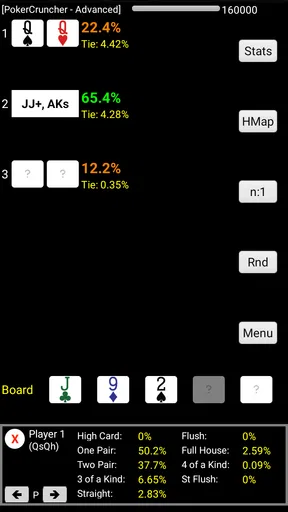
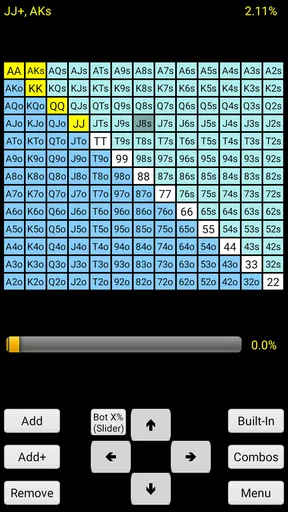
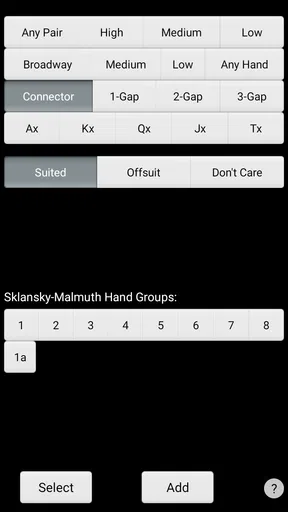
Our Review of PokerCruncher - Advanced Odds
 Analysis by Appyee
I usually judge a poker tool by what happens after the first burst of curiosity: does it help me think more clearly a few weeks later, or does it become another app I open once and forget? PokerCruncher - Advanced Odds is built for players who want to examine decisions rather than simply pass the time. It is a card game from PokerCruncher, LLC, focused on calculating Texas Hold’em equity across possible hands and ranges. That makes it a study aid, not a substitute for playing experience or a game table of its own.
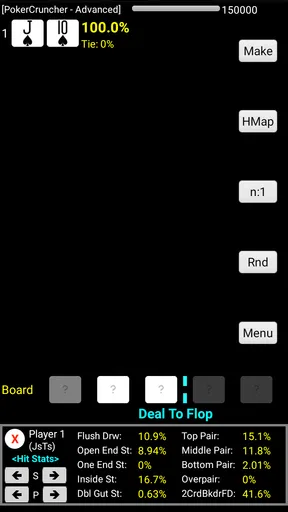
There is a lot to explore during the first few sessions. You can enter your cards, add community cards, and compare possible holdings; the appeal grows when you stop treating an opponent as if they must have one exact hand. Working with a range gives the calculation a more realistic strategic question to answer. My advice is to begin with a familiar hand you remember clearly, then change one assumption at a time. That makes the results easier to interpret than filling the screen with possibilities before you know what each input means.
The first week: learning to ask better questions
The useful habit is not asking, “Did I win this hand?” but “What did I know at the time, and how did my assumptions affect the decision?” A calculator can help separate a sound choice from a lucky outcome. I would enter a hand after a session, set the board as it stood at the important decision, and test a few plausible opponent ranges. Comparing those cases is more instructive than looking only at the final cards.
That workflow also exposes a limitation: the output is only as sensible as the range you enter. If I give an opponent an unrealistically narrow set of hands, the result may look precise while answering the wrong question. A useful practice is to record a conservative range and a wider one, then notice whether my conclusion changes. If it does, the uncertainty in my read matters more than a single equity figure.
Getting Into the Crunch
First off, let's talk about what PokerCruncher actually does. It’s a poker odds calculator that provides you with in-depth analysis and simulations. Whether you're a beginner trying to learn the ropes or a seasoned pro looking to refine your strategy, this app serves as your personal coach.
Once you fire it up, you’ll notice that it supports a wide range of poker games, including Texas Hold'em, Omaha Hi, and more. The interface might seem a bit daunting at first because of all the options, but trust me, it becomes intuitive pretty quickly. You can input your hand, your opponents' potential hands, and the community cards, and voilà! The app spits out the odds in an instant.
Features That Shine
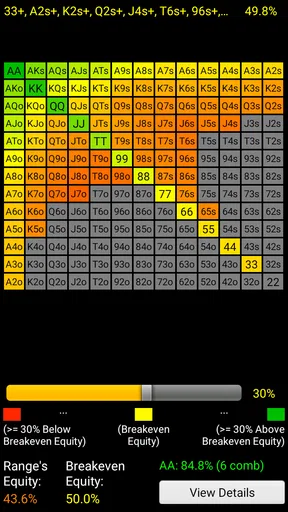
One of the coolest features is the hand range selection. This allows you to factor in the possible range of hands your opponents might hold, giving you a more comprehensive understanding of your odds. I mean, who doesn’t love a good range analysis, right?
Another feature that stands out is the advanced hand simulator. You can simulate multiple scenarios to see how different decisions would play out. It’s a bit like having a time machine for your poker decisions, letting you learn from potential mistakes before you even make them.
Oh, and did I mention the customizable features? You can tweak the app settings to match your play style or the specific rules of the poker variant you’re playing. This personalization is pretty neat, especially if you’re jumping between different types of games.
Why You’ll Love It
Using PokerCruncher feels like having a poker coach whispering in your ear, helping you make the smart plays. The app’s ability to show you exact odds and potential outcomes is invaluable. It’s like having a secret weapon every time you hit the virtual tables.
What I find particularly appealing is how it helps you improve your game over time. By analyzing different hands and scenarios, you start to see patterns and strategies that you might’ve missed before. It’s like the app is training you to think like a pro, which is super cool if you're trying to step up your game.
A sensible month-to-month routine
To keep the app useful, I would not try to review every hand. That quickly turns study into clerical work. Instead, save attention for decisions that felt close: a call you nearly made, a bet that seemed uncomfortable, or a spot where your opponent’s likely range was unclear. Revisit a handful of those situations periodically and compare your original assumptions with what you now think was plausible.
This is where the simulator can earn lasting space. Rather than asking it to certify a whole strategy, use it to isolate one choice: how equity changes when a particular card arrives, or how your estimate shifts when you include more possible hands. Those small comparisons build intuition. They also keep the exercise manageable on a busy day; a short, focused review is more likely to become a habit than an ambitious session that feels like homework.
For a realistic example, imagine finishing an online session and remembering a turn decision where you were unsure whether a call was justified. Later, enter the hand and board as they appeared at that point, then test a range that reflects the opponent’s plausible play rather than the hand they eventually revealed. If the result varies sharply when you widen that range, the practical lesson is to improve your read and decision process—not to memorize one answer. That distinction is valuable because poker outcomes are noisy, while the assumptions behind a decision can be examined.
Where it fits among poker tools
Compared with a basic odds calculator, a range-based approach can answer a more useful question than “What are my chances against this one hand?” It lets you consider several possible holdings at once, which better matches the uncertainty you face at a table. A quick calculator may be easier when you only want a simple matchup checked; this one makes more sense when you are willing to define and refine an opponent’s range.
It is also different from a poker game or a training course. It does not provide the social pressure, timing, or changing behavior of real opponents, and a numerical result cannot tell you whether your read is credible. I see it as a companion to play and review: use the table to gather experience, then use the calculator to inspect a decision. If you want entertainment, guided lessons, or practice against live opponents, another kind of poker app will fit better.
The advanced controls are both the attraction and the main source of friction. If you are new to poker, the number of choices can make a simple question feel technical. I would resist the urge to adjust every setting at once. Start with a basic hand comparison, learn how the inputs affect the result, and only then add ranges or alter settings for a particular game. That sequence reduces the risk of confusing a complicated setup with a better analysis.
What it asks of you over time
Its recurring value depends on your willingness to bring it real questions. There is no lasting benefit in repeatedly checking hands without a reason, and the calculator cannot supply the discipline to review them. Players who enjoy the analytical side of poker may find that the same range exercise stays interesting because each hand presents different assumptions. Players who mainly want a quick, frictionless diversion may find the detailed setup tiring once the novelty wears off.
There is also a practical boundary around when to use it. I would treat it as a study tool away from a live decision, not as permission to outsource judgment at the table. An equity estimate describes how a hand performs against the inputs you chose; it does not account for every strategic consideration or guarantee a profitable action. Keeping that distinction in mind prevents the app’s precise-looking output from creating false confidence.
The game has an average rating of 4.1 from around 220 ratings, and it has been installed over 10,000 times. It costs $12.99, so I would think of it as a deliberate purchase for ongoing study rather than a casual download. Its Teen age rating is worth noting for households, while the current version is 18.1.1 and the game dates back to Dec 22, 2011. Those details point to an established, specialized tool, but the key question for me is whether I will actually use its analysis after the first week.
Who should keep it—and who should pass
I would recommend it to a player who already understands basic poker hands and wants to get more deliberate about equity, ranges, and post-session review. It is particularly suited to someone who enjoys testing assumptions and can accept that a calculation is only as useful as its inputs. A regular home-game player could use it to examine a memorable spot between gatherings; a more serious student could make it part of a recurring review routine.
I would skip it if you want an app that teaches poker from the ground up, offers a polished playing experience, or makes decisions for you. The learning curve is real, and the paid price makes casual curiosity a weaker reason to install it. If all you need is a one-off check against a known hand, a simpler calculator may be enough. If you want to improve, though, its range-focused analysis gives you room to move beyond that basic use.
Final Thoughts
So, should you download PokerCruncher - Advanced Odds? If you’re serious about poker and want to improve your odds of winning, then absolutely. The app is a powerhouse for understanding the game on a deeper level, and it’s especially useful if you’re into playing online or in-person tournaments.
Sure, it might take a bit of time to get the hang of all its features, but once you do, you’ll wonder how you ever played without it. Whether you’re studying for your next big game or just want to impress your friends with your newfound poker skills, this app is worth every penny.
So, give it a whirl, and may the odds be ever in your favor!
Verdict
Strengths of PokerCruncher - Advanced Odds
- Highly detailed odds calculations.
- User-friendly interface for navigation.
- Customizable player profiles.
- Real-time scenario analysis.
- Supports various poker variants.
Limitations of PokerCruncher - Advanced Odds
- Steep learning curve for beginners.
- Limited tutorial resources.
- Requires in-app purchases for features.
- Occasional lag in older devices.
- No offline mode available.
Similar Picks in This Category
View All
Solitaire - Classic Card Games
MobilityWare4.6

UNO!™
Mattel163 Limited4.3

Spider Solitaire: Card Games
MobilityWare4.6

Solitaire.com - Classic Cards
Tripledot Studios Limited4.7

Plants vs. Zombies™ Heroes
ELECTRONIC ARTS4.1

Hearthstone
Blizzard Entertainment, Inc.4.1
Frequently Asked Questions
What is PokerCruncher - Advanced Odds used for?
PokerCruncher - Advanced Odds is a comprehensive poker odds calculator designed for serious poker players and enthusiasts. It allows users to calculate hand ranges, simulate poker scenarios, and improve their poker strategies through advanced features like hand history analysis and equity calculations. This app is ideal for enhancing your poker skills and decision-making processes.
Is PokerCruncher - Advanced Odds suitable for beginners?
While PokerCruncher - Advanced Odds offers advanced features aimed at experienced players, beginners can also benefit from it. The app provides detailed tutorials and explanations, helping new players understand poker probabilities and improve their game. However, beginners should be prepared for a learning curve due to its extensive functionalities.
Can I use PokerCruncher - Advanced Odds offline?
Yes, PokerCruncher - Advanced Odds can be used offline, making it convenient for users who wish to practice and analyze their poker strategies without an internet connection. This feature is particularly useful for travelers or those who want to use the app in areas with limited connectivity.
What devices are compatible with PokerCruncher - Advanced Odds?
PokerCruncher - Advanced Odds is available for both Android and iOS devices. It is optimized to run smoothly on smartphones and tablets, offering a user-friendly interface and responsive performance across different screen sizes. Ensure your device meets the app's requirements for the best experience.
Are there any in-app purchases or subscriptions in PokerCruncher - Advanced Odds?
PokerCruncher - Advanced Odds may offer in-app purchases or premium versions that unlock additional features or tools. These options provide enhanced functionalities like more detailed hand analysis and expanded simulation capabilities. Users should check the app store description for pricing details and decide based on their needs.
Play our best games!


